Nightstation
Make your footage look like it played on a CRT or came off a VHS tape.
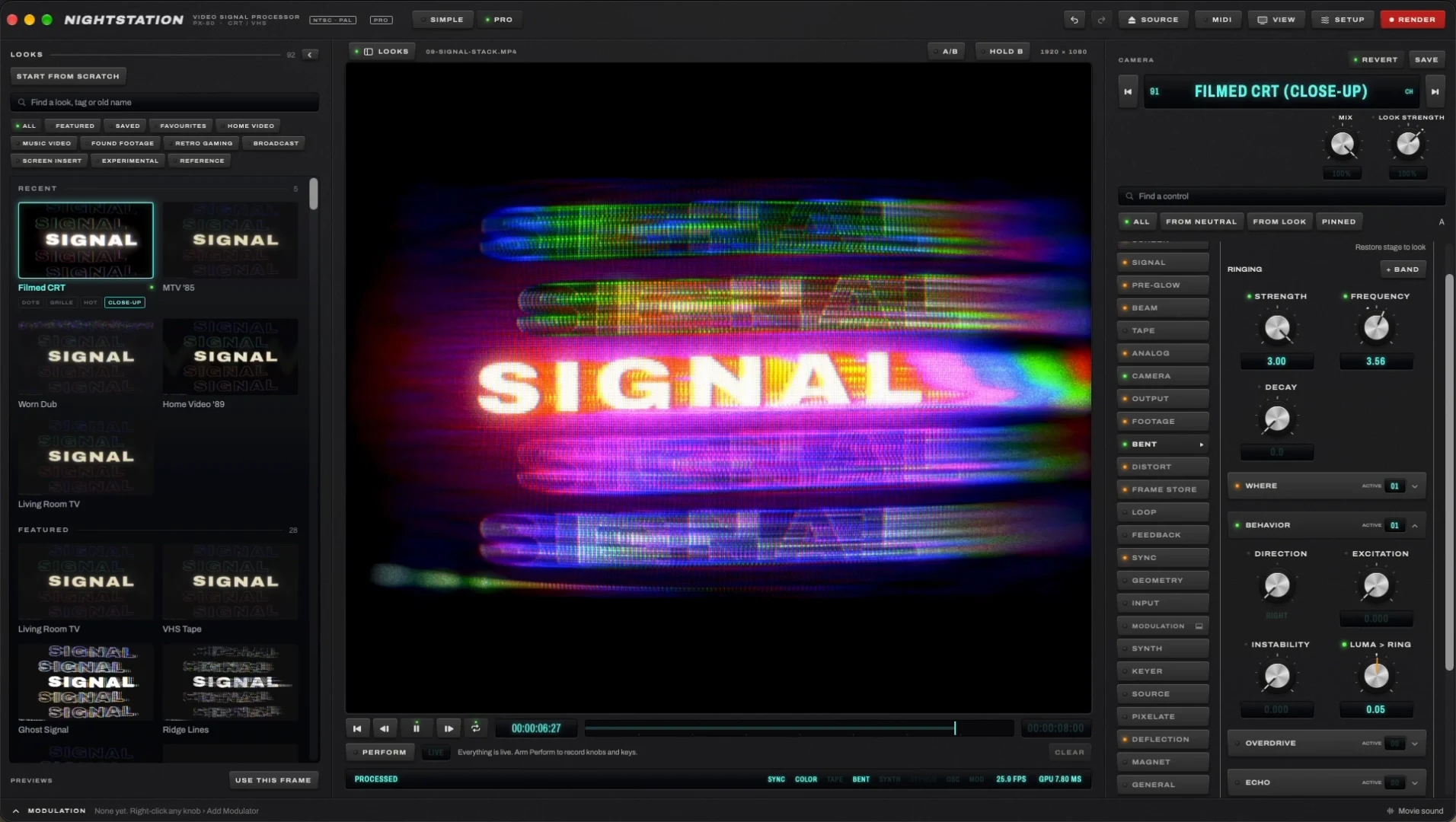
Shape the look in the Mac app, or work inside Resolve, After Effects and Premiere Pro. Bent and broken video effects are in there too.
Regular price $100.00Sale price $50.00Nightstation Launch: 50% offEnds One-time · App + plugins
- Free
- 11 looks
- Exports up to 720p
- Watermarked plugin output
- Pro
- All 121 looks
- Full resolution
- Full controls
- No watermark
Plugins are included. Install them in the Mac app under Setup → Updates. Plugin setup
Already purchased? Download and setup →Needs a Mac with Apple silicon (M1 or later). To check: Apple menu → About This Mac → Chip.
Before and after.
Original on the left. Drag to compare.
Chrome lettering, processed in two passes through Nightstation.
Free and Pro.
Start free. A license key unlocks Pro.| Free | Pro | |
|---|---|---|
| Built-in looks | 11 included | All 121 |
| Save and load custom looks | — | Included |
| Controls | Simple panel | Full controls and modulation |
| Export | Up to 720p | Full resolution |
| Screen and window capture | Included | Included |
| Live camera, Syphon and recording | — | Included |
| MIDI and OSC | — | Included |
| Agent control via MCP | — | Included |
| Plugins | Watermarked output | No watermark |
Nightstation Pro · One-time purchase
Regular price $100.00Sale price $50.00Nightstation Launch: 50% offEnds
The Mac app, all three plugins and every 1.x update, on one Mac at a time. Your key arrives by email and unlocks the free app in place. Taxes are added at checkout.
License and update termsPlugins are included. Install them in the Mac app under Setup → Updates. Plugin setup
Already purchased? Download and setup →Needs a Mac with Apple silicon (M1 or later). To check: Apple menu → About This Mac → Chip.
The free download only asks for an email.
Nightstation in 56 seconds.
- Live input
- Camera, screen capture or Syphon. Output to Syphon or a second display.
- Live control
- MIDI, OSC and audio-reactive control. Works with TouchDesigner.
- Looks
- 121 built-in looks, from VHS playback to filmed screens and bent video effects.
Nightstation Pro · Mac app
Build looks with an agent.
Nightstation has a built-in MCP server. Connect Claude, Cursor or another MCP-compatible agent to browse looks, adjust settings, preview the result and save your favorites.
Ask for a sharper screen, heavier ringing or a set of variations on a saved look. Changes appear in the app and can be undone. Enable it in Setup → Agents; the server runs locally on your Mac.
Questions.
- Will it run on my computer?
- A Mac with Apple silicon (M1 or later), running macOS 15 Sequoia or later. It doesn’t run on Intel Macs, Windows or Linux.
- Do I need Resolve, After Effects or Premiere Pro?
- No. The Mac app works on its own and exports movies and stills. If you do use an editor, you install the plugins from the app.
- How do I install the Resolve or Adobe plugin?
- Download Nightstation and move it to Applications. Quit your editor, open Nightstation → Setup → Updates, and click Install Plugin for Resolve or After Effects / Premiere Pro. Reopen your editor and search for NIGHTSTATION. Installing the app alone does not install the plugins. For Pro, enter your key in Setup → License; you don’t need to keep the app open afterward.
- What’s in the free version?
- 11 of the 121 looks, a simple control panel, screen and window capture, and exports up to 720p. The plugins work, with a watermark on their output.
- Is Pro a subscription?
- No. You pay once and get every 1.x update. A future major version may be a paid upgrade.
- How do I unlock Pro?
- Your license key arrives by email. Open Setup → License in the free app and enter it. Activation needs an internet connection.
- Can I move Pro to a new Mac?
- Yes. Choose Setup → License → Deactivate this Mac on the old one, then enter your key on the new one.
- Can I use what I make commercially?
- Yes. Your footage and everything you make with it are yours, with no royalties and no credit required.
- What if it isn’t for me?
- Email us within 14 days of buying Pro to request a refund. You don’t need to troubleshoot first.
Something else? The support page covers installing, activating and uninstalling.
Try it on your own footage.
The free version has 11 looks and exports up to 720p. Pro unlocks every look, the full controls and full-resolution exports for one payment.
Regular price $100.00Sale price $50.00Nightstation Launch: 50% offEnds One-time · App + plugins
Plugins are included. Install them in the Mac app under Setup → Updates. Plugin setup
Already purchased? Download and setup →Needs a Mac with Apple silicon (M1 or later). To check: Apple menu → About This Mac → Chip.
- A Mac with Apple silicon (M1 or later)
- macOS 15 Sequoia or later for the Nightstation app
- DaVinci Resolve (OFX plugin)
- Adobe After Effects (tested with 2026)
- Adobe Premiere Pro (tested with 2026)
Want finished CRT footage instead? We made a free pack with Nightstation.Get Tube Kit Vol. 1 →